



Business travel places different demands on a laptop than office-based work. Employees need a device that is light enough to carry through airports, client offices, hotels, and shared workspaces but capable enough to handle full workdays. The panasonic lets note range addresses this need with business-focused computers designed around portability, practical connectivity, and everyday professional use.
Portability Matters During Frequent Travel
Laptop weight may seem like a minor specification until an employee carries the device for several hours each day. A heavy computer, charger, accessories, and paperwork can make a business bag uncomfortable and difficult to manage.
A lightweight laptop can make moving between locations easier without forcing employees to depend on tablets or mobile phones for important tasks. Professionals can work on reports, presentations, spreadsheets, and business applications while maintaining access to a physical keyboard and full desktop operating system.
Size also affects portability. A computer should fit easily inside common business bags while offering enough screen space for productive work. Buyers should consider the laptop’s dimensions and total travel weight, including the charger and any required adapters.
A Larger Screen in a Travel-Friendly Format
Business travelers often work in temporary settings where an external monitor is unavailable. The laptop display must provide enough room for documents, browser windows, email, video meetings, and other daily tasks.
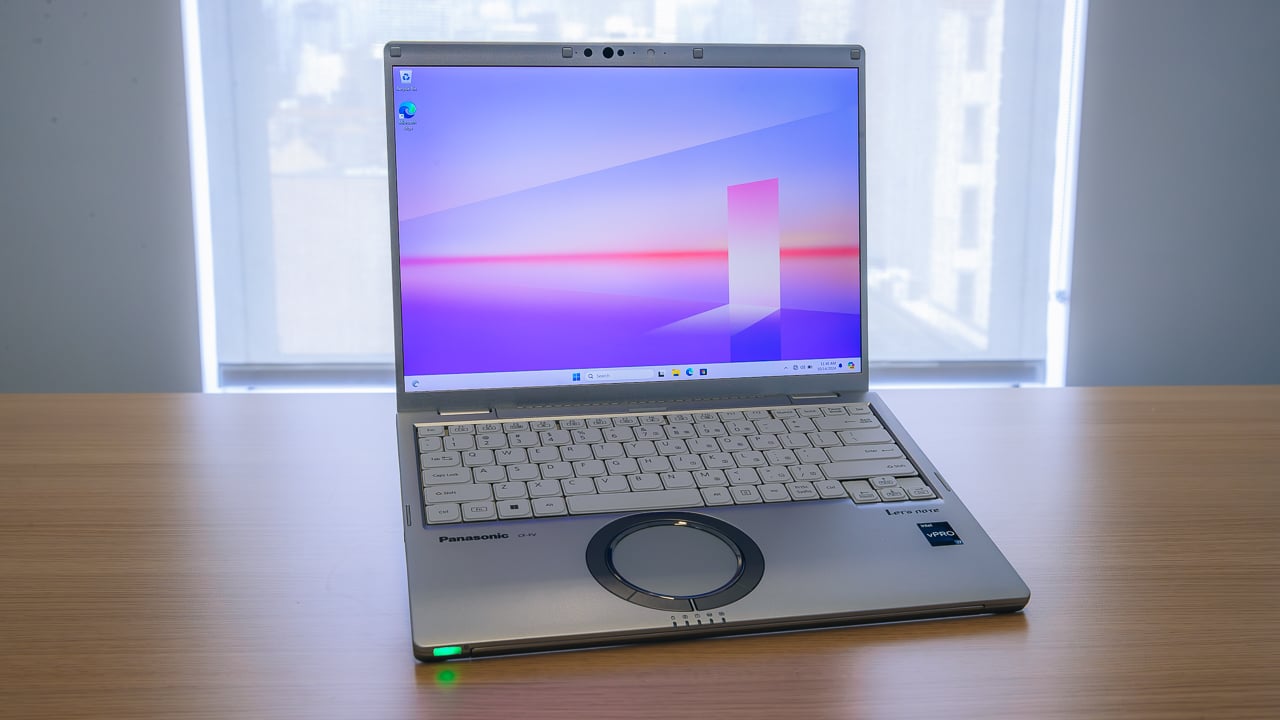
The Let’s Note FV4 uses a 14-inch display, giving professionals a useful balance between workspace and portability. A screen of this size can support multitasking without requiring the larger chassis associated with many desktop-replacement computers.
Resolution and aspect ratio should also be reviewed when comparing business laptops. Employees who regularly work with long documents or spreadsheets may benefit from a display that shows more vertical content. Buyers should also consider brightness and glare, especially when the laptop will be used near windows or in bright public areas.
Performance for Professional Applications
A travel laptop must do more than fit inside a small bag. It needs enough processing power and memory for the applications employees use throughout the day.
The appropriate configuration depends on the workload. Email, web applications, document editing, and video meetings may have moderate system requirements. Financial models, large spreadsheets, development tools, and visual applications can require more memory and processing capacity.
The FV4 is available in different configurations, so buyers should review the processor, memory, and storage included with the exact unit. Selecting hardware based on real software requirements can prevent slow performance while avoiding unnecessary spending.
Comfortable Input for Full Workdays
Thin laptops sometimes reduce keyboard depth or spacing to save room. This can become uncomfortable for employees who spend several hours writing reports, responding to messages, or entering business data.
Keyboard layout should be evaluated as carefully as processing specifications. Buyers should consider key spacing, travel, feedback, and the position of commonly used controls. The touchpad should also provide enough room for accurate navigation when a mouse is unavailable.
Professionals who enter large amounts of numeric data may have additional keyboard requirements. Reviewing the actual layout before purchase can help avoid frustration after deployment.
Connections Without a Bag Full of Adapters
Modern laptops often reduce the number of physical ports to achieve a thinner design. While this may create a cleaner appearance, it can force business travelers to carry multiple adapters.
Employees may need to connect projectors, external monitors, wired networks, storage devices, headsets, and other office equipment. A laptop with a useful selection of built-in connections can reduce setup time when moving between meeting rooms and client locations.
Before selecting a model, organizations should list the ports employees use regularly. They should also confirm Wi-Fi and Bluetooth capabilities for wireless accessories and workplace networks. If adapters are still required, purchasing them during deployment can prevent last-minute problems.
Battery Planning for Work Away From Outlets
Business travelers cannot always rely on easy access to power. Airport gates, conference rooms, trains, and customer sites may have limited outlets.
Battery requirements should be based on real work habits rather than advertised maximums. Video calls, high screen brightness, background applications, and wireless use can reduce operating time.
Employees should receive a suitable charger and understand the available power-saving settings. Organizations may also consider keeping spare chargers in frequently used offices to reduce the risk of employees leaving essential equipment behind.
Built for Regular Transportation
A business laptop may not face the same conditions as a fully rugged field computer, but it still experiences frequent handling. It may be placed in overhead bins, carried through crowded spaces, opened repeatedly during meetings, and transported between offices every day.
Build quality is therefore important. A computer intended for mobile work should provide a firm chassis, dependable hinges, and a design that can tolerate normal business travel. Employees should still use a padded bag and follow appropriate handling procedures because lightweight construction does not make a laptop immune to damage.
Security for Mobile Employees
Travel increases the risk of loss, theft, and unauthorized access. Organizations should confirm that the selected laptop supports their required operating system, encryption, authentication methods, and remote management tools.
Security policies should include automatic screen locking, strong sign-in requirements, encrypted storage, and procedures for reporting a missing device. Employees should also avoid leaving computers unattended in vehicles, conference spaces, or public areas.
Choose the Configuration That Fits the Role
The right laptop should match the employee’s workload, travel frequency, connection needs, and security requirements. Buyers should compare the exact processor, memory, storage, operating system, ports, warranty, and included accessories before ordering.
Organizations looking for a lightweight Panasonic FV4 for business travel, hybrid work, or everyday office use can visit Tough Rugged Laptops to review the available configuration and determine whether it suits their professional computing needs.