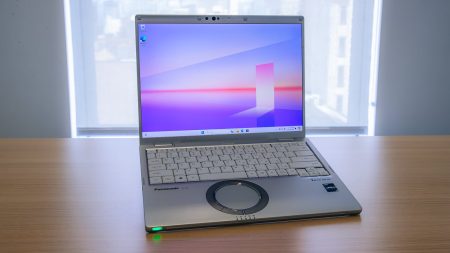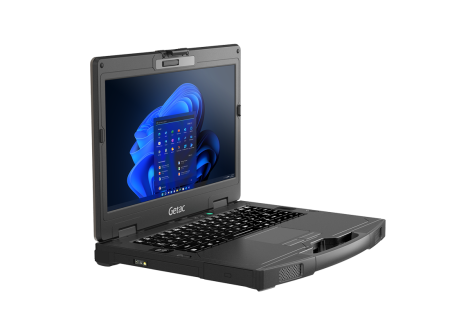





Standard business computers can perform well in an office, but field work creates a different set of demands. Dust, moisture, vibration, temperature changes, accidental drops, and vehicle use can quickly expose the limits of an ordinary device. Purpose-built rugged laptops are designed for these conditions, but buyers still need to compare models carefully. The right choice depends on where the computer will be used, which applications it must run, and how much downtime the organization can accept.
Begin With the Working Environment
A purchasing decision should start with the job site rather than the computer specifications. A laptop used inside a warehouse faces different risks from one installed in a patrol vehicle or carried across an outdoor construction site.
Consider the conditions employees experience during a normal shift:
- Dust, sand, or airborne debris
- Rain, splashes, or high humidity
- Direct sunlight
- Extreme heat or cold
- Repeated vibration inside vehicles
- Drops from desks, carts, or standing height
- Frequent movement between indoor and outdoor areas
Documenting these conditions helps buyers avoid paying for unnecessary protection or selecting a device that cannot withstand routine use.
Understand Durability Ratings
Rugged computers may be described as semi-rugged, fully rugged, or ultra-rugged. These labels are useful starting points, but they should not replace a close review of test results.
MIL-STD testing can indicate how a device performs when exposed to drops, vibration, altitude, humidity, or temperature changes. However, buyers should check which tests were completed and under what conditions. A broad military-standard reference does not always mean that every possible durability test applies.
Ingress Protection ratings provide information about resistance to solids and liquids. The two digits in an IP rating address these hazards separately. Organizations operating around dust or moisture should compare the complete rating instead of relying only on promotional terms.
Evaluate the Display in Real Conditions
Screen quality affects more than visual comfort. Employees who cannot read a display outdoors may enter incorrect information, miss instructions, or spend additional time finding shade.
For outdoor work, consider display brightness, anti-reflective treatments, and viewing angles. A touchscreen can be helpful for inspections, signatures, mapping, and form completion, but buyers should determine whether it works with gloves or in wet conditions.
Convertible models and detachable tablets may suit employees who alternate between typing and standing tasks. Traditional clamshell laptops may be better for jobs requiring frequent keyboard input or extended use at a mobile workstation.
Look Beyond Advertised Battery Life
Battery estimates are often based on controlled testing. Actual operating time may be shorter when employees use cellular connections, GPS, high screen brightness, specialized software, or several connected accessories.
Teams that work long shifts should consider:
- Replaceable batteries
- Dual-battery configurations
- Hot-swappable battery support
- Vehicle charging options
- Availability and cost of replacement batteries
A device that supports battery changes without shutting down can help employees continue working during extended shifts.
Check Ports and Wireless Connectivity
A rugged computer must connect with the equipment already used by the organization. Depending on the job, that equipment may include barcode scanners, printers, cameras, diagnostic tools, external antennas, serial devices, or vehicle docks.
Create a list of required ports before comparing models. Do not assume that adapters will provide a dependable long-term solution, particularly inside vehicles or industrial settings.
Wireless needs should also be assessed. Wi-Fi may be sufficient for fixed facilities, while mobile teams may require cellular connectivity, GPS, Bluetooth, or dedicated antenna connections. Connection requirements can influence the model and configuration selected.
Consider Vehicle Mounting and Docking
Police departments, utility crews, emergency services, and transportation companies often install computers inside vehicles. In these situations, device selection should account for mounting space, docking compatibility, power connections, visibility, and safe access.
A laptop may meet performance requirements but still be unsuitable if it blocks controls, restricts passenger movement, or lacks a compatible dock. Buyers should review the complete installation before ordering a large number of devices.
Compare New and Refurbished Models
New equipment may provide access to current processors, newer connection standards, and manufacturer coverage. Refurbished equipment can offer considerable savings for organizations that do not need the newest specifications.
The condition and configuration of a refurbished device matter. Buyers should review its processor, memory, storage, operating system, battery condition, testing process, and warranty. Older models may remain suitable for inventory systems, vehicle applications, field reporting, or software with modest hardware requirements.
Calculate the Full Ownership Cost
Purchase price is only one part of the budget. Repairs, replacement batteries, docks, accessories, configuration work, software compatibility, and employee downtime can change the true cost of a device.
A less expensive computer may cost more over time if it fails frequently or cannot support essential equipment. A properly selected rugged model can reduce interruptions and extend the useful life of field hardware.
The strongest purchasing decision comes from matching the computer to the work, testing requirements, and existing equipment. Buyers comparing Panasonic Toughbook models, refurbished devices, accessories, upgrades, or repair options can visit Tough Rugged Laptops to review available field-computing products and request help selecting the right configuration for their team.