


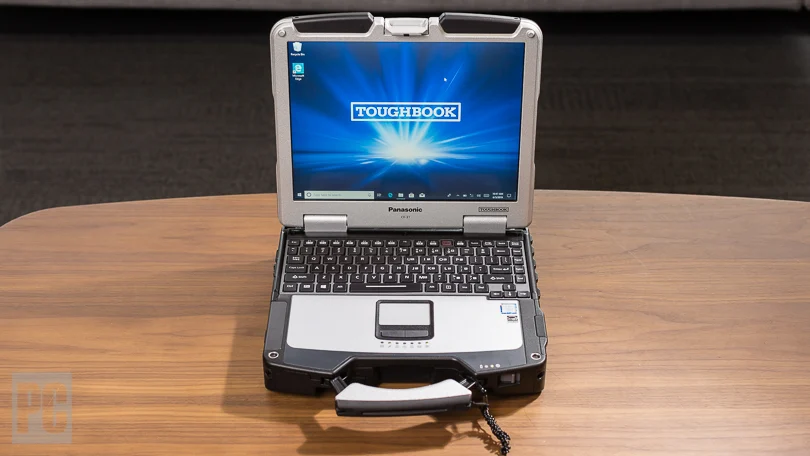
Field workers often need more from a computer than employees working from a conventional office. Equipment may be carried between vehicles, exposed to vibration, handled outdoors, or used around machinery and changing weather conditions. The panasonic toughbook cf 31 was built for these types of situations, giving organizations a fully rugged laptop platform designed around durability, field usability, and compatibility with professional equipment.
Built for Harsh Working Conditions
The CF-31 was developed as a fully rugged computer rather than a standard business notebook.
Across the product family, the laptop features a magnesium-alloy chassis and was built to meet MIL-STD-810G and IP65 standards. These ratings are relevant for organizations whose computers may encounter dust, vibration, moisture, drops, and frequent transportation.
A conventional laptop may work well in an office but can be less suitable when it is regularly moved between trucks, workshops, job sites, and outdoor locations.
For utility workers, automotive technicians, construction teams, or industrial employees, physical durability can be just as important as processor speed or storage capacity.
Designed With Field Visibility in Mind
The CF-31 uses a 13.1-inch touchscreen display, giving workers a compact screen that can still provide enough room for maps, diagnostic tools, service applications, forms, and technical documents.
Touch capability can also be useful in situations where using a mouse is inconvenient.
A technician standing beside a machine, for example, may need to move through diagnostic screens while working rather than returning to a desk. Touch input can make that process more practical.
Display requirements should still be considered carefully when purchasing a CF-31 because specifications may differ by generation and configuration.
Connectivity Can Be a Major Advantage
One reason older rugged laptops continue to appear in professional environments is their support for ports that have disappeared from many newer consumer computers.
Certain CF-31 configurations include USB ports, Ethernet, VGA, HDMI, PC Card support, and RS-232 serial connectivity. These connections can matter in industries where computers communicate with established machinery, automotive diagnostic equipment, measurement devices, or other specialized systems.
A serial port, for instance, may seem outdated for general home computing, but it can remain necessary for equipment that was designed around RS-232 communication.
Replacing a working industrial system merely because a new laptop lacks the proper connection may not always make financial sense.
CF-31 Generations Are Not All the Same
The Panasonic Toughbook CF-31 was produced across multiple generations, commonly identified as MK1 through MK6.
These versions can differ considerably.
Earlier generations use older Intel Core processors and generally support less memory, while later versions offer stronger processors, higher memory limits, and USB 3.0 support. Buyers should therefore avoid treating every CF-31 as identical.
The generation can affect:
- Processor performance
- Maximum RAM
- USB capability
- Operating system compatibility
- Wireless features
- Available expansion options
This makes the model number and configuration particularly important when buying refurbished hardware.
A company running an established diagnostic application may have very different requirements from a field organization using newer business software.
Useful Across Several Field-Based Industries
The CF-31 can still make sense for organizations that value ruggedness and equipment compatibility.
Possible applications include:
- Automotive diagnostics
- Utility maintenance
- Construction site operations
- Fleet management
- Warehouse work
- Manufacturing environments
- Equipment servicing
- Public safety support
- Mobile repair work
In these settings, a laptop may spend much of its life inside a service vehicle, on a workshop bench, or next to industrial equipment.
That changes the purchasing priorities.
Thin construction and minimal weight may become less important than a reinforced case, usable ports, touchscreen access, and resistance to everyday field conditions.
Docking Compatibility Can Matter
Another consideration for organizations already using Toughbook equipment is compatibility with existing installations.
The CF-31 maintained compatibility with vehicle docking equipment across several earlier Toughbook generations.
For fleets that already have docks installed in service vehicles, this can reduce the amount of supporting hardware that needs to be replaced.
A laptop purchase should therefore be considered as part of the broader equipment setup rather than as an isolated device.
Vehicle power adapters, docks, antennas, software, and peripheral requirements may all influence which configuration makes the most sense.
Check the Configuration Before Buying
Because the CF-31 has been discontinued as a new product, buyers will commonly encounter refurbished models and different configurations.
Before purchasing, businesses should review:
- Exact CF-31 generation
- Processor model
- Installed RAM
- Storage type and capacity
- Touchscreen condition
- Battery condition
- Required ports
- Wireless connectivity
- Operating system compatibility
- Warranty coverage
Storage upgrades can be particularly worthwhile. Moving from an older mechanical hard drive to an SSD can improve startup speed and everyday responsiveness.
Organizations should also confirm that required software will run properly on the selected operating system and hardware generation.
Choose Rugged Hardware Around the Job
The Panasonic Toughbook CF-31 remains relevant where durability, touchscreen access, legacy connectivity, and field-ready construction are more important than owning the newest consumer notebook. The right configuration depends on the software, ports, working environment, and performance level required by the user. Organizations looking for rugged computing equipment can visit Tough Rugged Laptops to compare available models and choose hardware suited to field, industrial, automotive, and professional applications.